Homecare Pro & Viventium

Homecare Pro vs. Viventium for caregiver onboarding

Viventium gives managers tools to run onboarding. Homecare Pro does the onboarding and HR compliance work for your team: following up with caregivers, collecting documents, running checks, renewing credentials, and more, so managers only step in when a decision is needed.
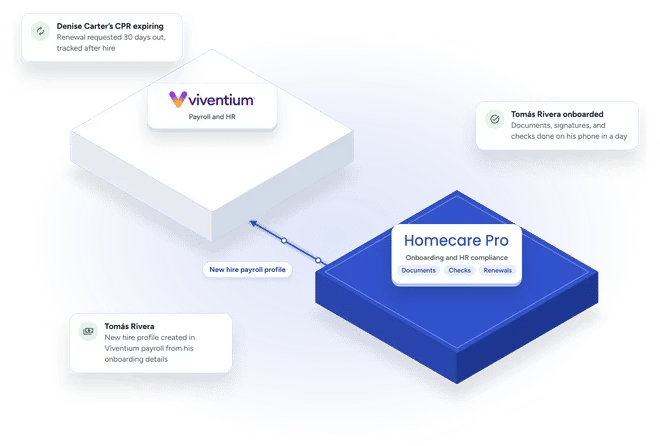
Diagram of Homecare Pro working alongside Viventium: Viventium handles payroll and HR; Homecare Pro handles onboarding and HR compliance, including documents, checks, and renewals, and sends each new hire's payroll profile to Viventium. Tomás Rivera finishes his documents, signatures, and checks on his phone in a day and his payroll profile is created from his onboarding details, while Denise Carter's CPR renewal is requested 30 days out and tracked after hire.
How they compare

Two ways to run caregiver onboarding

Viventium

Payroll and HR, with onboarding tools your managers run.

Homecare Pro

Onboarding and HR compliance done for your team in the background, with every requirement in one place and synced with your EMR.

How it works

From onboarding to Viventium payroll

1

Caregivers complete onboarding

New hires complete their documents, signatures, and checks on their phones.

2

Homecare Pro creates the profiles

When onboarding is complete, Homecare Pro creates the new hire’s profile in Viventium payroll and in your EMR.

3

Compliance stays current

Homecare Pro tracks every requirement for as long as a caregiver is active and requests renewals before they lapse.

Automatic follow-up

Automatic follow-up with caregivers

Homecare Pro follows up with caregivers when a task is unfinished, so managers don’t chase new hires to complete onboarding.

  • Automatic reminders
  • Follow-up on every unfinished task
  • Managers step in only when a decision is needed
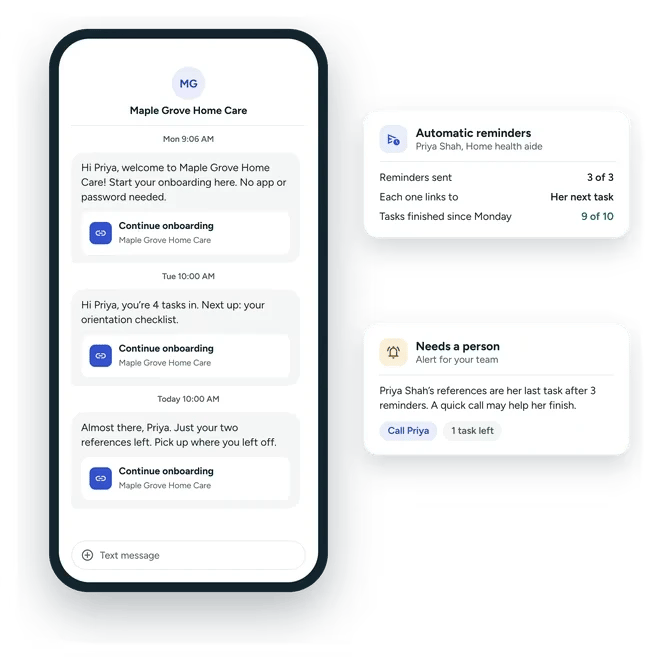
Automatic text reminders from Maple Grove Home Care to caregiver Priya Shah on her phone, each with a link to continue onboarding: a welcome on Monday, a nudge that her orientation checklist is next, and a note that only her references are left. Beside the phone, 3 of 3 reminders sent with 9 of 10 tasks finished since Monday, and an alert telling the team Priya's references are her last task, with an option to call her.
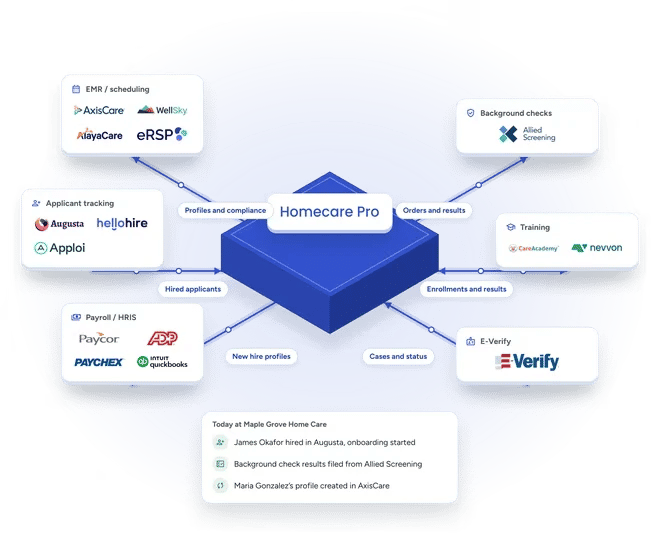
Homecare Pro connected to the systems home care agencies use: EMR and scheduling, applicant tracking, payroll and HRIS, background checks, training, and E-Verify, each shown with partner logos. A card shows today's activity: James Okafor hired in Augusta with onboarding started, background check results filed from Allied Screening, and Maria Gonzalez's profile created in AxisCare.
Integrations

Every part of onboarding and compliance in one place

Homecare Pro integrates with the systems behind each requirement: background checks, registry checks, E-Verify, training, your ATS, payroll, and your EMR. Homecare Pro files every document and result to the caregiver’s record, so your team sees each caregiver’s onboarding and compliance status in one place.

  • EMR / Scheduling / AMS:AxisCare, WellSky, AlayaCare, eRSP
  • Payroll / HRIS:Paycor, ADP, Paychex, Viventium, QuickBooks Payroll, Paylocity, isolved, and many more
  • ATS:Augusta, HelloHire, Apploi
  • Background checks, registries, and E-Verify:Allied Screening, E-Verify, OIG, SAM, Social Security Death Master File, and many more
  • Continuing education:CareAcademy, Nevvon
EMR sync

Compliance and documents synced with your EMR

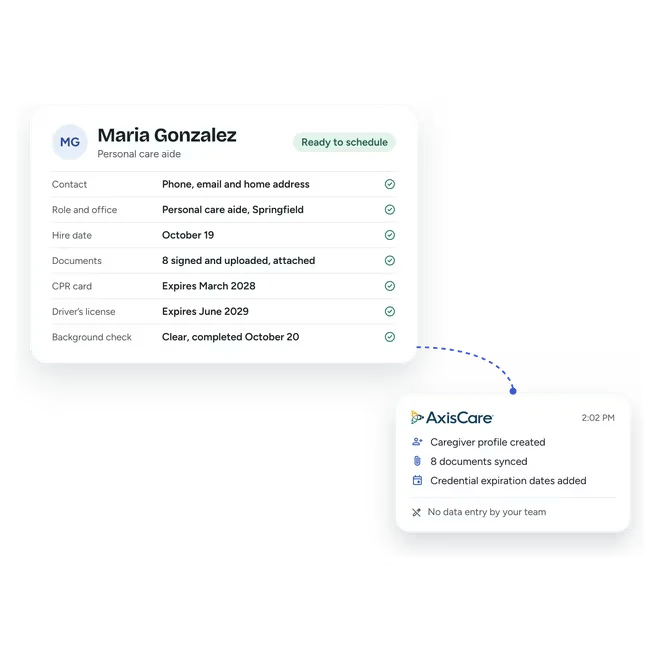
When onboarding is complete, Homecare Pro creates the caregiver’s profile in your EMR, whether that’s AxisCare, WellSky, AlayaCare, or eRSP, with their onboarding documents. Homecare Pro then syncs renewals and compliance data and keeps the EMR’s active caregiver list current, so schedulers only book caregivers who are compliant.

  • Profiles created with onboarding documents
  • Renewals and compliance data synced
  • Active caregiver list kept current
Caregiver Maria Gonzalez's profile in Homecare Pro, marked ready to schedule, with her contact details, role and office, hire date, 8 signed and uploaded documents, CPR card and driver's license expiration dates, and a clear background check. A card beside it shows the sync to AxisCare: caregiver profile created, 8 documents synced, and credential expiration dates added, with no data entry by the agency's team.
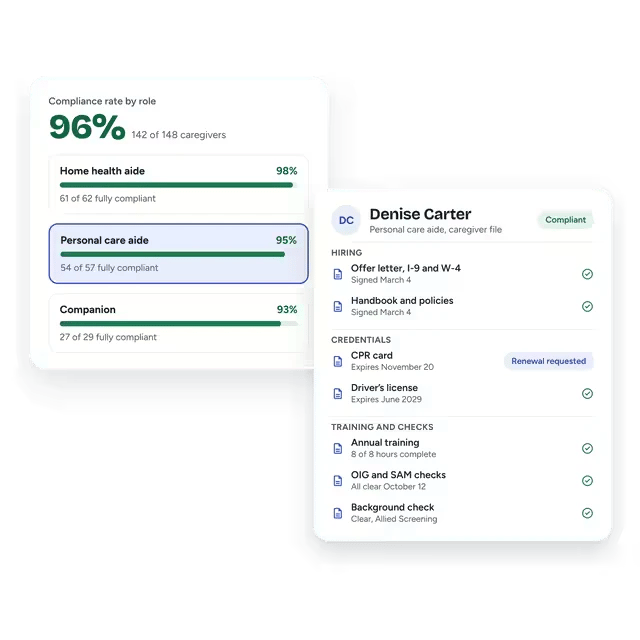
Compliance rate by role for Maple Grove Home Care: 96% overall, 142 of 148 caregivers. Home health aides are at 98% (61 of 62), personal care aides at 95% (54 of 57) and companions at 93% (27 of 29). Personal care aide is selected, with Denise Carter's digital caregiver file open beside it, marked compliant. Her file groups documents into hiring, credentials, and training and checks, with a CPR card renewal requested before it expires November 20.
HR compliance

HR compliance tracked after the first shift

Homecare Pro tracks every requirement by role for as long as a caregiver is active, requests renewals before they lapse, and shows your compliance rate on any day, so your files stay audit-ready.

  • Every requirement tracked by role
  • Renewals requested automatically
  • Compliance rate on any day
Learn more

Related pages

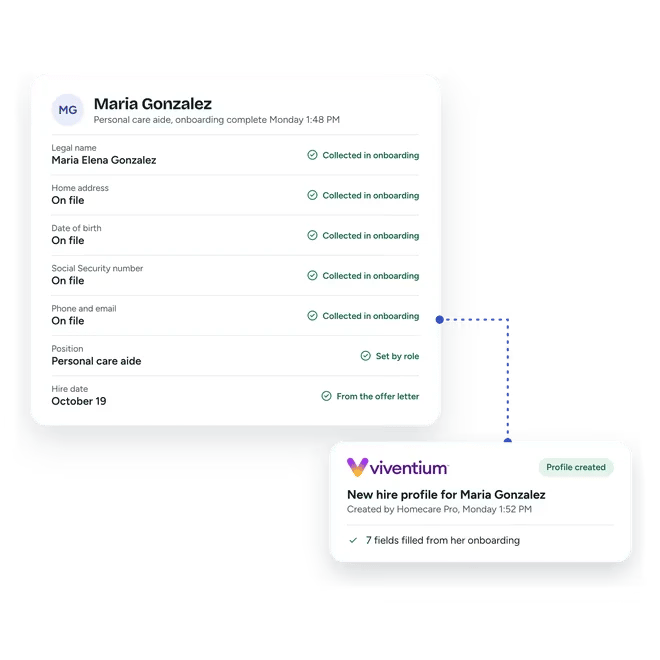
Homecare Pro record for Maria Gonzalez, a personal care aide at a sample agency, onboarding complete Monday at 1:48 PM: legal name, home address, date of birth, Social Security number, and phone and email collected in onboarding, position set by role and hire date from the offer letter. A dotted line leads to a Viventium card: her new hire profile was created in payroll by Homecare Pro at 1:52 PM, with 7 fields filled from her onboarding.

Viventium integration

Homecare Pro creates new hire profiles in Viventium when onboarding is complete.
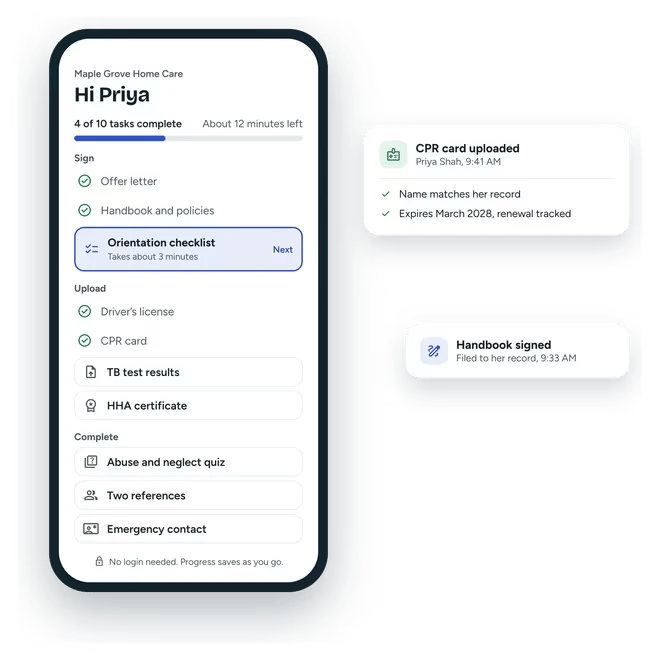
Caregiver Priya Shah's onboarding on her phone, 4 of 10 tasks complete with about 12 minutes left, grouped into things to sign, upload, and complete, with her orientation checklist up next and no login needed. Beside the phone, her CPR card upload is checked for her name and an expiration of March 2028 that will be tracked for renewal, and her signed handbook is filed to her record.

Caregiver onboarding

Caregivers self-serve through onboarding.
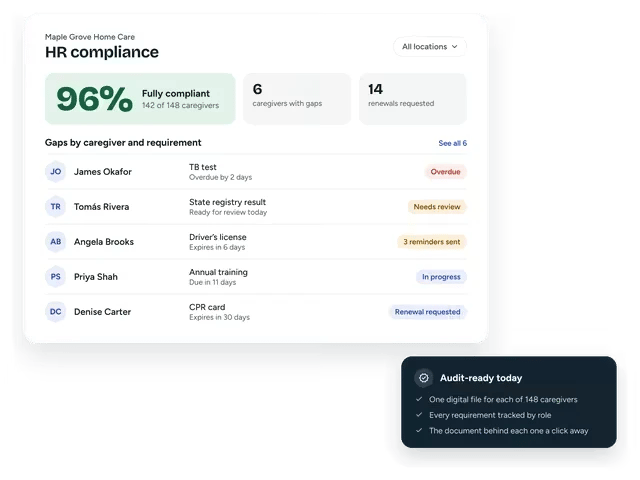
Homecare Pro HR compliance dashboard for Maple Grove Home Care. 96% of caregivers are fully compliant, 142 of 148, with 6 caregivers with gaps and 14 renewals requested. Gaps by caregiver and requirement: a TB test overdue, a state registry result to review, a driver's license expiring in 6 days, annual training in progress and a CPR card renewal requested. A card notes the agency is audit-ready today.

HR compliance

Homecare Pro tracks every requirement by role and renews credentials before they lapse.

Homecare Pro and Viventium questions

How is Homecare Pro different from Viventium Onboarding?
keyboard_arrow_down

Viventium Onboarding gives managers tools to run onboarding. Homecare Pro does the work for your team: following up with caregivers, running checks, renewing credentials, and creating profiles in your EMR and payroll system.

Can we use Homecare Pro with Viventium payroll?
keyboard_arrow_down

Yes. Homecare Pro creates new hire profiles in Viventium when onboarding is complete, so your team doesn’t re-enter new hire details.

Does Homecare Pro track compliance after onboarding?
keyboard_arrow_down

Yes. Homecare Pro tracks every requirement by role for as long as a caregiver is active and requests renewals before they lapse.

How long does it take to get started?
keyboard_arrow_down

Agencies are typically live in about a week.

Still have questions?

See how Homecare Pro compares

In 30 minutes we’ll walk through onboarding from the offer letter to a first shift, and the compliance work Homecare Pro does after it.
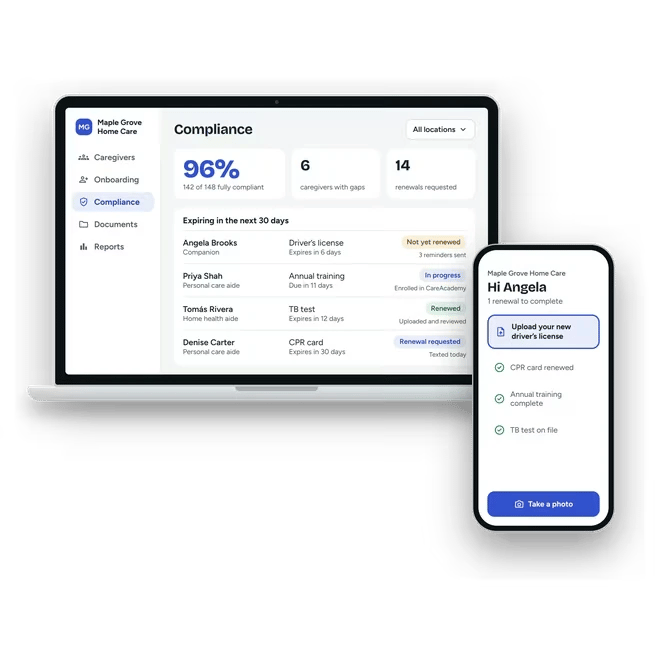
Homecare Pro's compliance view on a laptop for Maple Grove Home Care, showing a 96% compliance rate, 6 caregivers with gaps, 14 renewals requested, and four credentials expiring in the next 30 days, each with what Homecare Pro has done about it. A phone beside it shows caregiver Angela Brooks asked to upload her new driver's license.