Integrations

Home care payroll integration with the system you already use

Homecare Pro creates each new hire’s profile in your payroll system when onboarding is complete, so your team doesn’t type anything in twice.

Works with
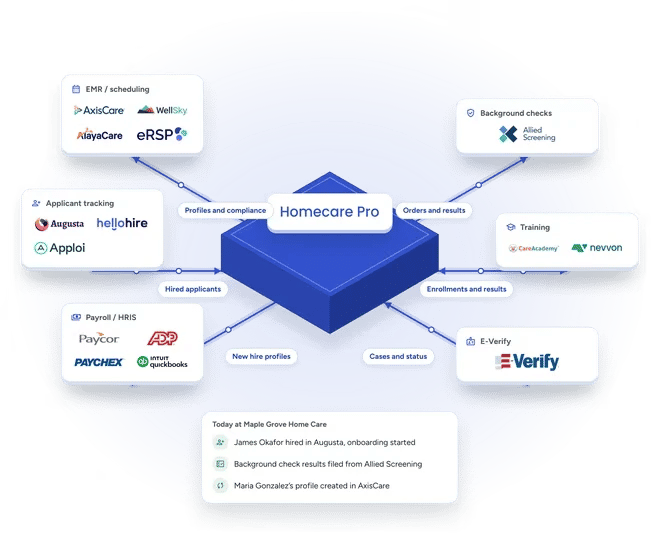
Homecare Pro connected to the systems home care agencies use: EMR and scheduling, applicant tracking, payroll and HRIS, background checks, training, and E-Verify, each shown with partner logos. A card shows today's activity: James Okafor hired in Augusta with onboarding started, background check results filed from Allied Screening, and Maria Gonzalez's profile created in AxisCare.
Supported systems

Payroll systems Homecare Pro works with

Don’t see your payroll system? Homecare Pro creates new hire profiles in many more. Ask us about yours.

Paycor

Profiles created in Paycor when onboarding is complete.

ADP

Profiles created in ADP when onboarding is complete.

Paychex

Profiles created in Paychex when onboarding is complete.

Viventium

Profiles created in Viventium when onboarding is complete.

Gusto

Profiles created in Gusto when onboarding is complete.

QuickBooks Payroll

Profiles created in QuickBooks Payroll when onboarding is complete.
Paylocity

Profiles created in Paylocity when onboarding is complete.

isolved

Profiles created in isolved when onboarding is complete.

How it works

From onboarding to payroll

1

Caregivers complete onboarding

New hires complete their forms, signatures, and documents on their phones.

2

Homecare Pro creates the payroll profile

When onboarding is complete, Homecare Pro creates the new hire’s profile in your payroll system.

3

Your team runs payroll

Your team finishes pay setup and runs payroll as usual.

Payroll profiles

New hire profiles created in your payroll system

When a new hire completes onboarding, Homecare Pro creates their profile in your payroll system, so your team doesn’t re-enter new hire details.

  • Profiles created when onboarding is complete
  • Works with Paycor, ADP, Paychex, and many more
  • No re-entering new hire details
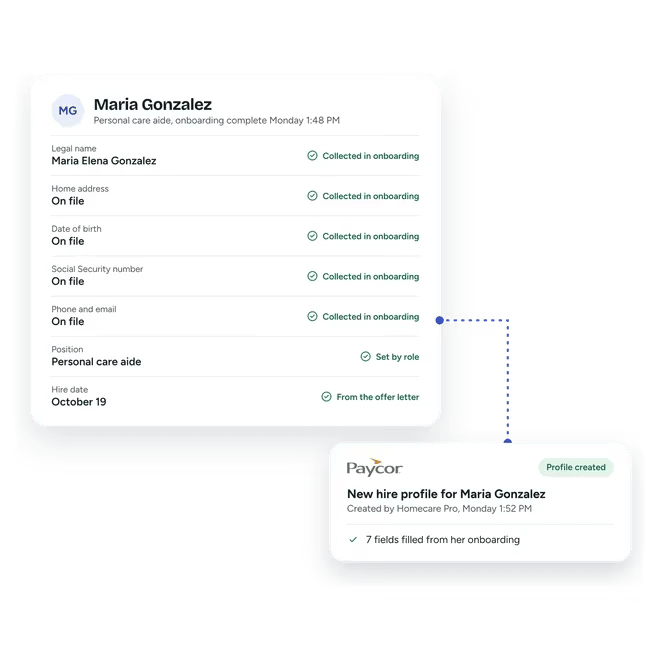
Homecare Pro record for Maria Gonzalez, a personal care aide at a sample agency, onboarding complete Monday at 1:48 PM, with the details collected in onboarding: legal name, home address, date of birth, Social Security number, and phone and email on file, position set by role and an October 19 hire date from the offer letter. A dotted line leads to a Paycor card: new hire profile created by Homecare Pro at 1:52 PM, with 7 fields filled from her onboarding.
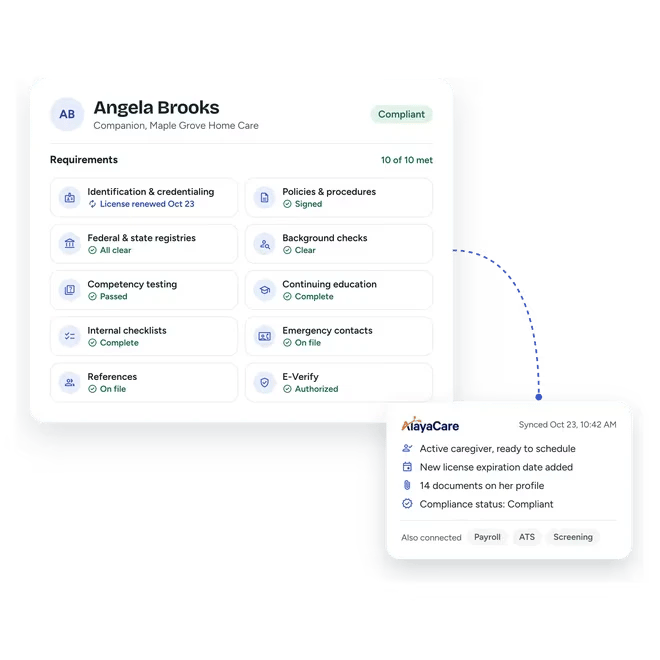
Homecare Pro record for Angela Brooks, a companion caregiver, marked compliant with all 10 requirements met, from identification and credentialing (license renewed October 23) to E-Verify. A dotted line leads to an AlayaCare card synced the same day: active caregiver ready to schedule, new license expiration date added, 14 documents on her profile, compliance status compliant. Payroll, ATS and screening are also connected.
One record

One record across onboarding, your EMR, and payroll

Homecare Pro collects caregiver details once during onboarding and creates profiles in your EMR and payroll system, so every system starts from the same record.

  • Details collected once during onboarding
  • Profiles in your EMR and payroll system
  • No re-keying between systems
Integrations

Related integrations

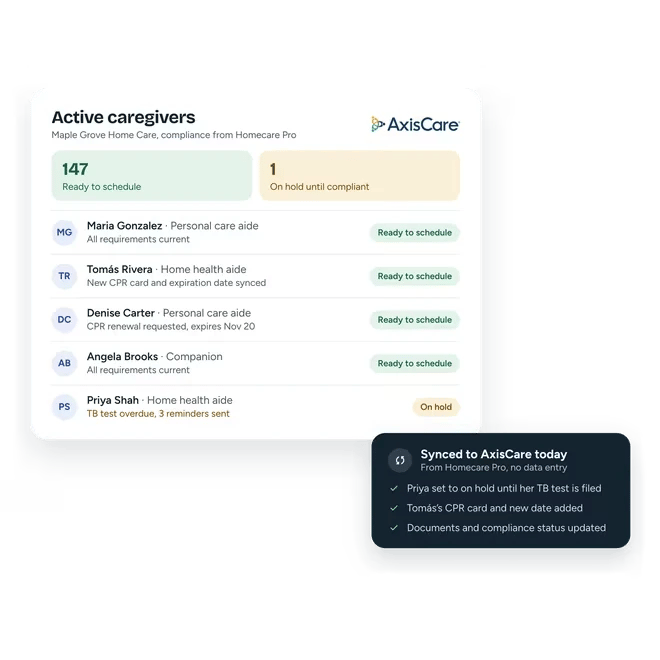
Homecare Pro compliance status on a sample agency's active caregiver list in AxisCare: 147 ready to schedule and 1 on hold until compliant. Maria Gonzalez, Tomás Rivera (new CPR card and expiration date synced), Denise Carter (CPR renewal requested, expires November 20) and Angela Brooks are ready to schedule. Priya Shah is on hold with a TB test overdue after 3 reminders. A card shows today's sync to AxisCare from Homecare Pro, with no data entry.

EMR / Scheduling / AMS

Homecare Pro creates caregiver profiles in your EMR when onboarding is complete.
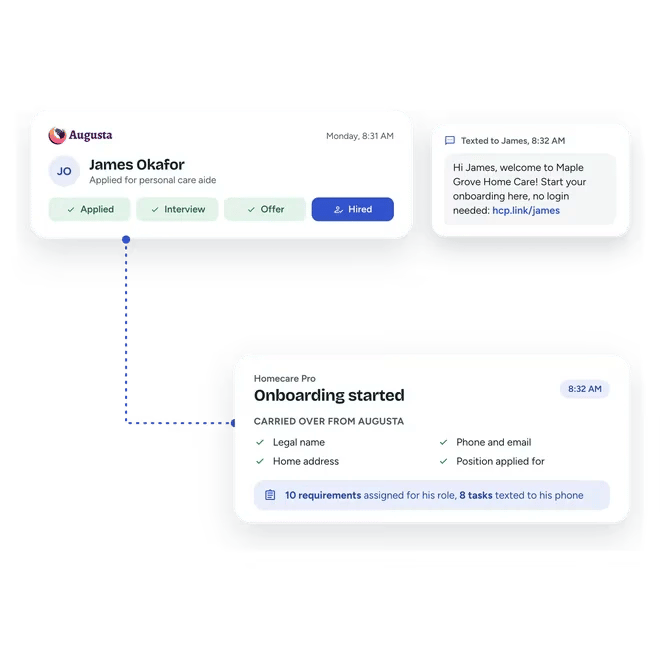
James Okafor marked hired for personal care aide in Augusta on Monday at 8:31 AM, after applied, interview and offer. A minute later Homecare Pro texts him a welcome from a sample agency with a link to start onboarding, no login needed. A dotted line leads to Homecare Pro's onboarding started card, with his legal name, phone and email, home address and position carried over from Augusta, 10 requirements assigned for his role and 8 tasks texted to his phone.

ATS

Homecare Pro starts onboarding when a caregiver is hired in your ATS.
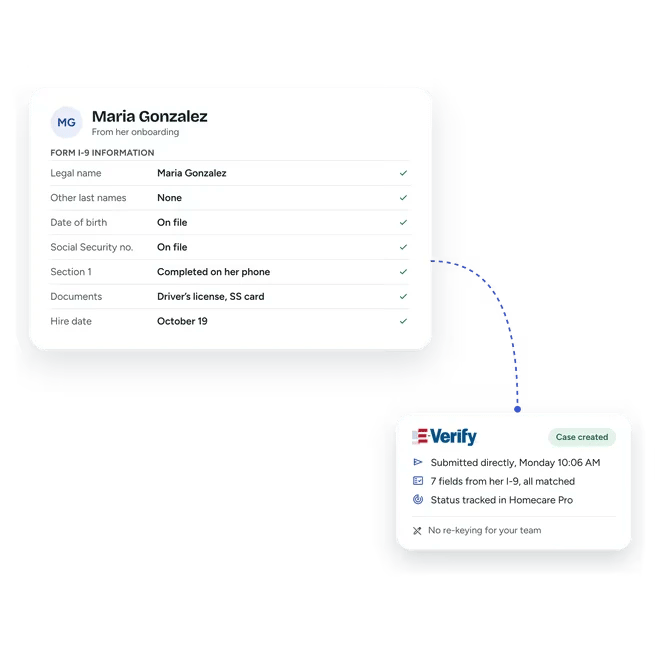
Homecare Pro screen of Maria Gonzalez’s Form I-9 information from onboarding: legal name, other last names, date of birth and Social Security number on file, Section 1 completed on her phone, her documents and an October 19 hire date, each checked. A dotted line leads to an E-Verify card showing the case created and submitted directly on Monday, 7 fields from her I-9 matched, status tracked in Homecare Pro, and no re-keying for the team.

E-Verify

Homecare Pro submits and tracks E-Verify cases inside onboarding.

Payroll integration questions

Which payroll systems does Homecare Pro work with?
keyboard_arrow_down

Paycor, ADP, Paychex, Viventium, Gusto, QuickBooks Payroll, Paylocity, and isolved.

When is the payroll profile created?
keyboard_arrow_down

When the new hire completes onboarding.

Does Homecare Pro run payroll?
keyboard_arrow_down

No. Your team runs payroll in the system you already use. Homecare Pro creates each new hire’s profile with the details collected during onboarding, and your team finishes pay setup.

How long does it take to get started?
keyboard_arrow_down

Agencies are typically live in about a week.

Still have questions?

See payroll setup in Homecare Pro

In 30 minutes we’ll walk through onboarding from the offer letter to a new hire’s profile in your payroll system.
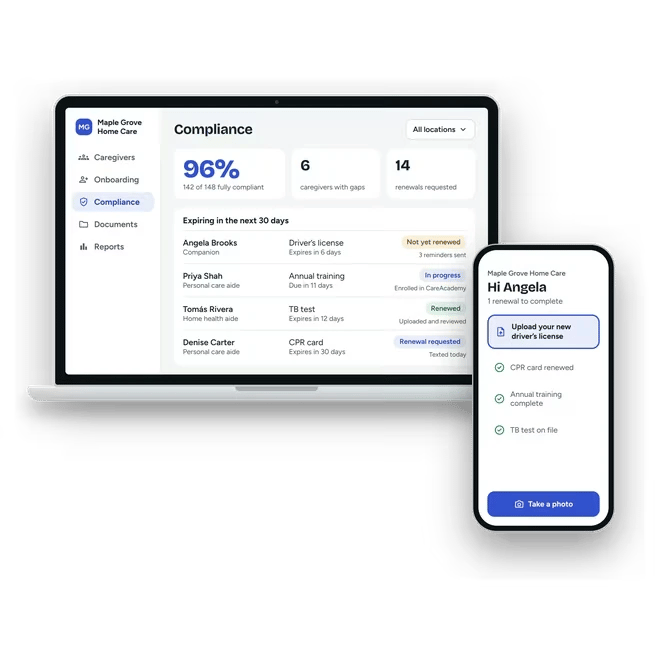
Homecare Pro's compliance view on a laptop for Maple Grove Home Care, showing a 96% compliance rate, 6 caregivers with gaps, 14 renewals requested, and four credentials expiring in the next 30 days, each with what Homecare Pro has done about it. A phone beside it shows caregiver Angela Brooks asked to upload her new driver's license.