Paychex integration for home care agencies
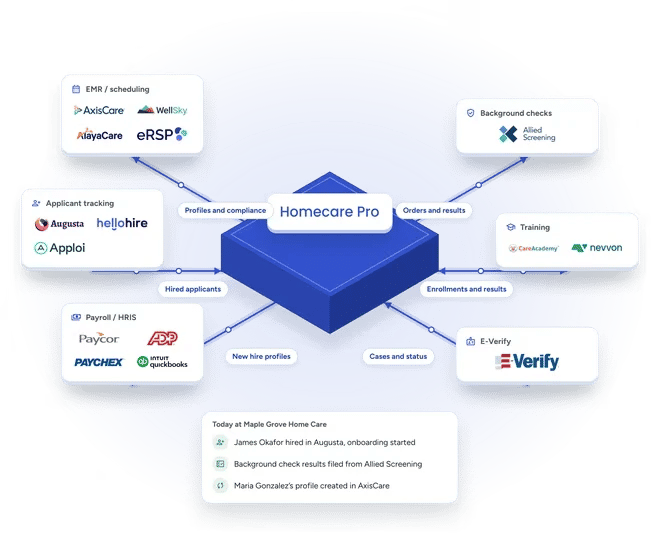
Homecare Pro integrates with Paychex to create each new hire’s payroll profile when onboarding is complete. Homecare Pro fills the profile with the details collected during onboarding, so your team doesn’t type anything in twice.

What syncs between Paychex and Homecare Pro
How the Paychex integration works
Caregivers complete onboarding
New hires complete their forms, signatures, and documents on their phones.
Homecare Pro creates the payroll profile
When onboarding is complete, Homecare Pro creates the new hire’s profile in Paychex.
Your team runs payroll
Your team finishes pay setup and runs payroll in Paychex as usual.
- Profiles created when onboarding is complete
- Details and documents carried over from onboarding
- No re-entering new hire details
Paychex
Paychex
Paychex
- Documents synced as caregivers complete and renew requirements
- Credential expiration dates kept current
- Active caregiver list in sync with compliance
- Onboarding started at hire
- Candidate details carried over
- New hires self-serve through onboarding
Paychex
Paychex
Paychex
- Status for every new hire
- Missing items listed
- Alerts when a new hire needs a person
Related pages

Payroll / HRIS integrations
Homecare Pro creates new hire profiles in Paycor, ADP, Paychex, Gusto, and more when onboarding is complete.

EMR / Scheduling / AMS integrations
Homecare Pro creates caregiver profiles in your EMR when onboarding is complete.
Paychex integration questions
When the new hire completes onboarding.
No. Your team runs payroll in Paychex. Homecare Pro creates each new hire’s profile with the details collected during onboarding, and your team finishes pay setup.
Agencies are typically live in about a week.
Still have questions?
See Homecare Pro with Paychex
In 30 minutes we’ll walk through onboarding from the offer letter to a new hire’s profile in Paychex.