AxisCare integration for home care agencies
Homecare Pro integrates with AxisCare to automate caregiver onboarding and HR compliance behind it. When you hire in AxisCare, Homecare Pro runs onboarding, creates the caregiver’s profile in AxisCare, and keeps documents and compliance in sync, so your team schedules caregivers who are ready to work.


What syncs between AxisCare and Homecare Pro
How the AxisCare integration works
Homecare Pro onboards the new hire
When an applicant is hired in AxisCare, Homecare Pro starts their onboarding and works with the caregiver to complete their profile, with every document and piece of compliance data, ready to be scheduled.
You schedule in AxisCare
Your team schedules caregivers in AxisCare as usual.
Homecare Pro keeps the profile compliant
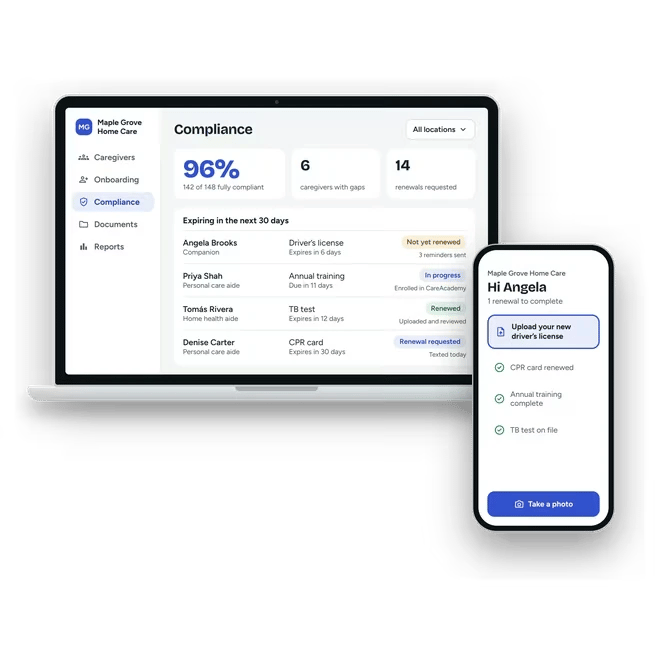
Homecare Pro renews documents and compliance data before they expire and updates the caregiver’s Compliance tab in AxisCare, so they stay ready to schedule. Anything that puts compliance at risk is flagged to your team.
Caregiver profiles created in AxisCare
When an applicant hired in AxisCare completes onboarding, Homecare Pro creates their caregiver profile in AxisCare with the details and documents collected during onboarding, so your schedulers can book a first shift without data entry.
- Profiles created when onboarding is complete
- Details and documents carried over from onboarding
- No re-entering new hire details
AxisCare
AxisCare
AxisCare
Compliance kept current in AxisCare
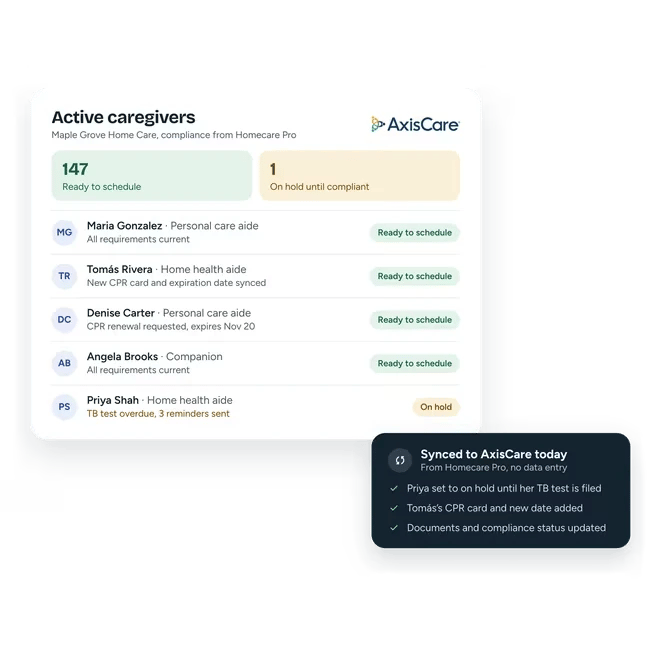
As caregivers complete and renew requirements, Homecare Pro uploads their files to the Compliance page in AxisCare and keeps your active caregiver list in sync with compliance, so schedulers only book caregivers who are ready to work.
- Documents synced as caregivers complete and renew requirements
- Credential expiration dates kept current
- Active caregiver list in sync with compliance
Caregiver profiles created in AxisCare
When an applicant hired in AxisCare completes onboarding, Homecare Pro creates their caregiver profile in AxisCare with the details and documents collected during onboarding, so your schedulers can book a first shift without data entry.
- Onboarding started at hire
- Candidate details carried over
- New hires self-serve through onboarding
AxisCare
AxisCare
AxisCare
Compliance kept current in AxisCare
As caregivers complete and renew requirements, Homecare Pro uploads their files to the Compliance page in AxisCare and keeps your active caregiver list in sync with compliance, so schedulers only book caregivers who are ready to work.
- Status for every new hire
- Missing items listed
- Alerts when a new hire needs a person
SYNERGY HomeCare of Yuma runs on AxisCare. Caregivers onboarded through Homecare Pro are created in AxisCare ready to be scheduled, and the active caregiver list stays in sync with compliance.
- +20%caregiver workforce without adding managers
- 60manager hours saved a month

“Homecare Pro gives me the independence I want as an agency owner. I can log in, quickly review the status, and make decisions without having to check in with my team. It’s given me freedom to focus on the strategic direction of the business rather than getting bogged down in the day-to-day.”
Related pages
EMR / Scheduling / AMS integrations
Homecare Pro creates caregiver profiles in AxisCare, WellSky, AlayaCare, and eRSP and keeps compliance in sync.

Homecare Pro & AxisCare
What AxisCare and Homecare Pro each do, for agencies deciding whether they need both.
AxisCare integration questions
Yes. Your team keeps hiring, scheduling, and managing care in AxisCare. Homecare Pro does the onboarding and HR compliance work in the background and keeps AxisCare up to date.
Homecare Pro picks up status changes your team makes in AxisCare. When an applicant is marked hired, Homecare Pro starts their onboarding, so nobody enters the new hire twice.
The caregiver’s profile when onboarding is complete, plus files and documents on the Compliance page as caregivers complete and renew their requirements. Status works the other way: Homecare Pro picks up status changes from AxisCare.
Still have questions?
See Homecare Pro with AxisCare
In 30 minutes we’ll walk through an AxisCare hire, the onboarding that follows, and how compliance stays in sync.