Integrations

E-Verify integration for home care agencies

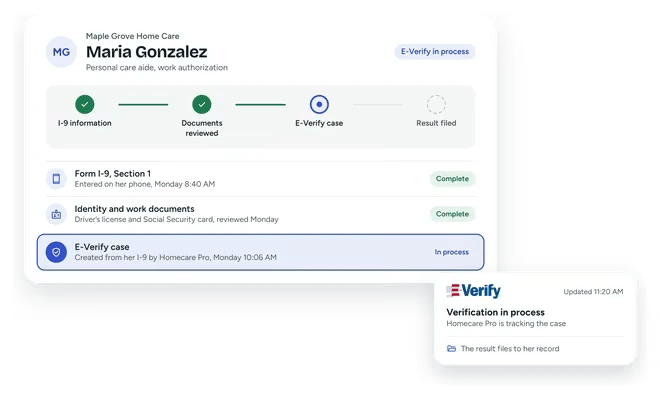
Homecare Pro integrates with E-Verify to handle work authorization inside caregiver onboarding. Homecare Pro creates each E-Verify case from the caregiver’s Form I-9, tracks it to a result, and files the result in their record.

Homecare Pro connected to E-Verify: the Homecare Pro logo on a white card above, linked by a dotted line through a sync icon to the E-Verify logo on a white card below.
What syncs

What syncs between E-Verify and Homecare Pro

Cases created from the I-9

Homecare Pro creates the E-Verify case from the information the caregiver enters on their Form I-9.

Case status

Homecare Pro tracks each case through to a result inside caregiver onboarding.

Results filed to the caregiver

Homecare Pro files the case result in the caregiver’s record with their onboarding documents.

How it works

How the E-Verify integration works

1

Caregivers complete the I-9

New hires complete Section 1 of their Form I-9 on their phones during onboarding.

2

Homecare Pro creates the case

Homecare Pro creates the E-Verify case from the I-9 and submits it for your agency.

3

The result is filed

Homecare Pro tracks the case to a result and files it in the caregiver’s record.

Caregiver profiles

  • Profiles created when onboarding is complete
  • Details and documents carried over from onboarding
  • No re-entering new hire details
Maple Grove Home Care
Maria Gonzalez
Ready to schedule
Home health aide - onboarding complete
check_circle
Caregiver profile created
Contact, role, hire date
check_circle
Onboarding documents synced
8 documents
check_circle
Credential expiration dates added
CPR, license
sync
Created in

E-Verify

- no data entry
Maple Grove Home Care
Active caregivers
294 of 300 compliant
Synced with

E-Verify

Denise Carter
Compliant
Angela Brooks
Renewal requested
James Okafor
Compliant
Priya Shah
Needs review
sync
Compliance synced to

E-Verify

today
Compliance sync

  • Documents synced as caregivers complete and renew requirements
  • Credential expiration dates kept current
  • Active caregiver list in sync with compliance
Hire to onboarding

  • Onboarding started at hire
  • Candidate details carried over
  • New hires self-serve through onboarding

E-Verify

candidate
James Okafor
Hired
Personal care aide
check_circle
Onboarding started
1 min after hire
check_circle
Name, phone, and email
Carried over
check_circle
Role requirements assigned
10 tasks
sync
From

E-Verify

to Homecare Pro - no data entry
Maple Grove Home Care
New hires in onboarding
12 this week
Hired in

E-Verify

James Okafor
1 item left
Lena Ortiz
4 items left
Marcus Bell
Needs a person
notifications
Your recruiter is alerted about Marcus
Recruiter visibility

  • Status for every new hire
  • Missing items listed
  • Alerts when a new hire needs a person
Learn more

Related pages

E-Verify

E-Verify

Homecare Pro submits and tracks E-Verify cases inside onboarding.

Payroll / HRIS integrations

Payroll / HRIS integrations

Homecare Pro creates new hire profiles in your payroll system when onboarding is complete.

E-Verify integration questions

Who submits the E-Verify case?
keyboard_arrow_down

Homecare Pro creates and submits each case for your agency from the caregiver’s Form I-9.

Do caregivers need to do anything extra?
keyboard_arrow_down

No. Caregivers complete Section 1 of their Form I-9 on their phones during onboarding, and Homecare Pro creates the case from it.

How long does it take to get started?
keyboard_arrow_down

Agencies are typically live in about a week.

Still have questions?

See Homecare Pro with E-Verify

In 30 minutes we’ll walk through an I-9 and the E-Verify case Homecare Pro creates from it.
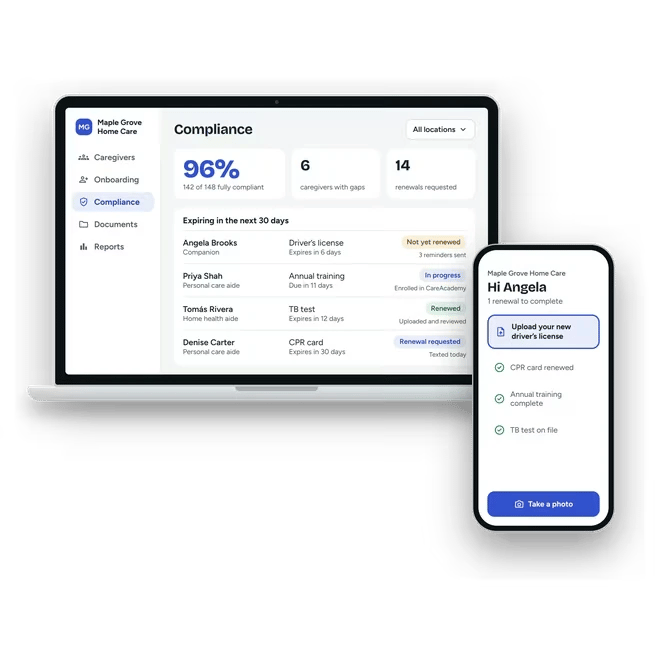
Homecare Pro's compliance view on a laptop for Maple Grove Home Care, showing a 96% compliance rate, 6 caregivers with gaps, 14 renewals requested, and four credentials expiring in the next 30 days, each with what Homecare Pro has done about it. A phone beside it shows caregiver Angela Brooks asked to upload her new driver's license.